
How to download from Pinterest in 3 steps
Works in any browser on iPhone, Android, Mac, or PC. Public pins only — no login, no software to install.
Example pin URL: https://www.pinterest.com/pin/112027111109431342/
-
Step 1: Copy the Pinterest link
Open the pin, board, or profile in the app or browser. Share → Copy link, or copy a full URL with
/pin/. Shortpin.itlinks work too.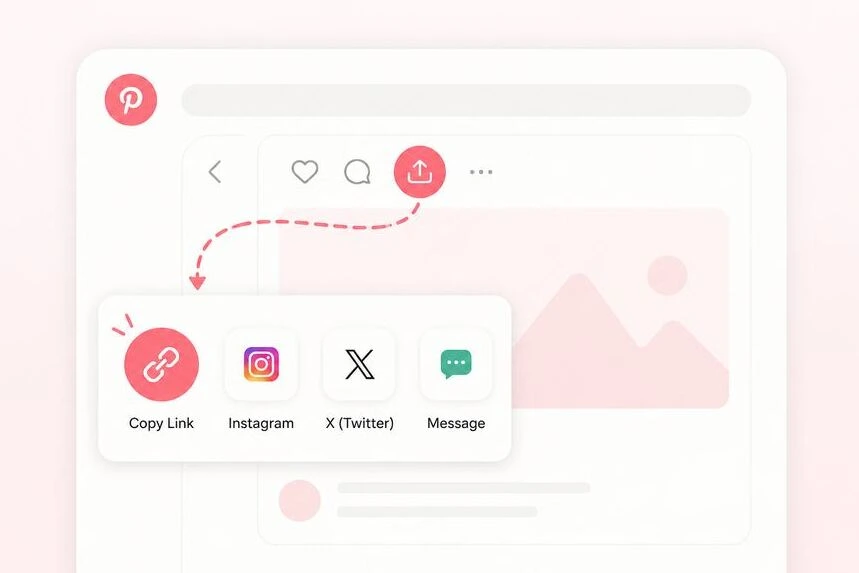
-
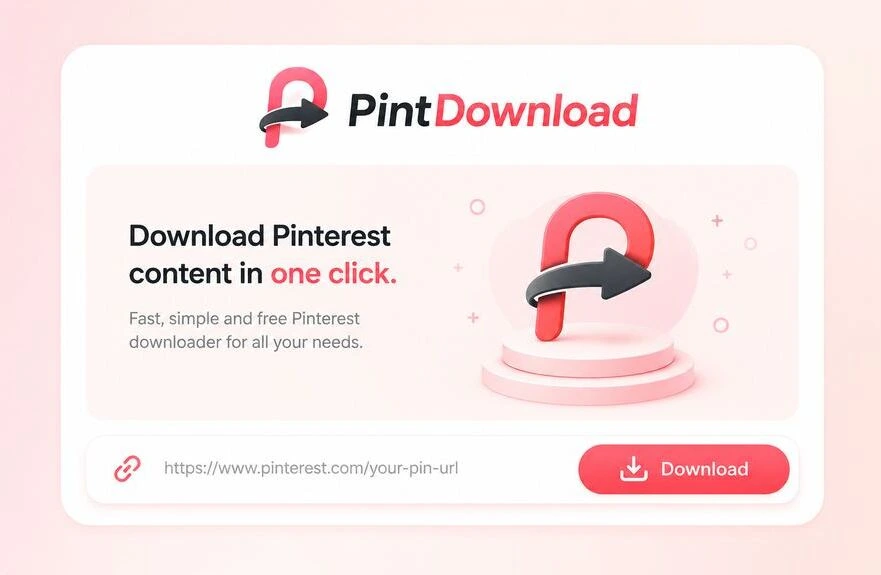
Step 2: Paste into PintDownload
Paste the public link in the box above and tap Download. Works for videos, photos, GIFs, boards, and profiles.
-
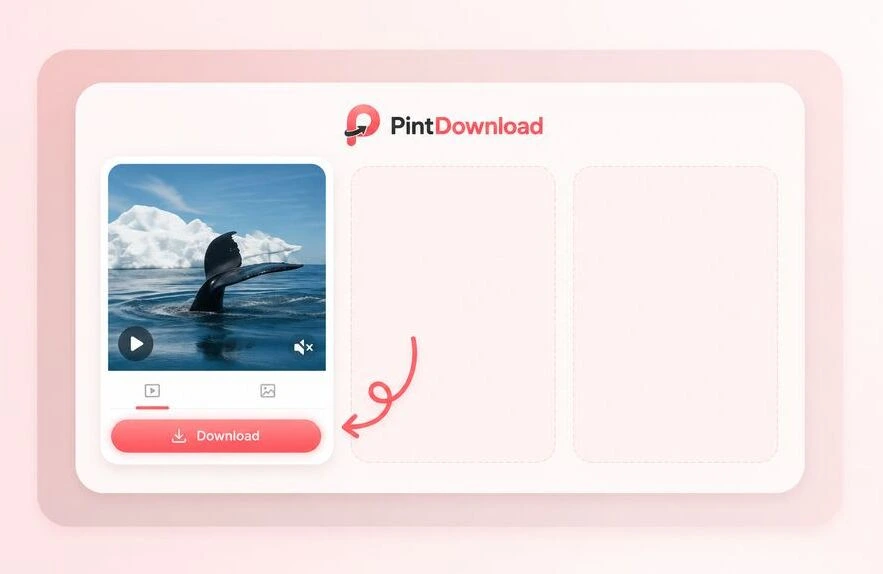
Step 3: Preview and save
Choose quality if offered, then save to Downloads, Photos, or Gallery. Board and profile links pack into a ZIP.
Specialized download tools
Each tool takes one kind of link. Pick the stock that matches yours and you land on the right downloader first time.
- Pin Pin Downloader One pin URL → HD image, video, GIF, or full carousel.
- MP4 Video Downloader Save public Pinterest videos as MP4 (HD streams).
- HD Image Downloader Photos and artwork in the largest size Pinterest publishes.
- ZIP Board Downloader Paste a board URL and download public pins as a ZIP.
- ZIP Profile Downloader Pack visible public pins from a profile into a ZIP.
- GIF GIF Downloader Download animated GIF pins without quality loss.
- Mobile iPhone & Android Gallery Saver Save Pinterest videos directly to your phone camera roll.
- Slides Carousel Downloader Download all photos and slides from multi-image pins.
- Chrome Chrome Extension Tool 1-click browser download tool for Chrome, Safari, and Edge.
- Gallery Gallery Video Saver Step-by-step guide to saving Pinterest videos in phone gallery.
- PC Laptop & PC Downloader Download Pinterest videos as MP4 on Mac, Windows, & PC.
- PFP Profile Picture Downloader Save the largest profile photo Pinterest publishes.
- MP4 Pinterest to MP4 Convert a Pinterest video link to a downloadable MP4.
- MP3 Audio / MP3 Extractor An MP3 of a video pin's sound, made in your browser.
Credit original creators
If you use someone else’s Pinterest video or image in content you publish (Reels, TikTok, YouTube, ads), credit the original creator. Personal offline reference is fine; republishing without credit or a license is not. Read the before-you-download guide.
How people make money with Pinterest
Creators and shop owners use Pinterest for affiliate traffic, digital products, and brand deals. Save references offline while you plan, then publish pins you own.
- Creators Make money on Pinterest (2026) Affiliate, products, and creator paths in plain English.
- Guide Download videos fast & easy Step-by-step MP4 workflow for phone and desktop.
- Boards Download a board as ZIP Bulk-save public moodboards for offline reference.
- PFP / DP Download a profile picture in HD Full-size Pinterest avatar, PFP, and DP — not the tiny app thumbnail.
- No blog Make money without a website Affiliate and product paths that do not need a blog on day one.
- Offline Save Pinterest offline, no account Download public pins first, then watch or browse files with no login.
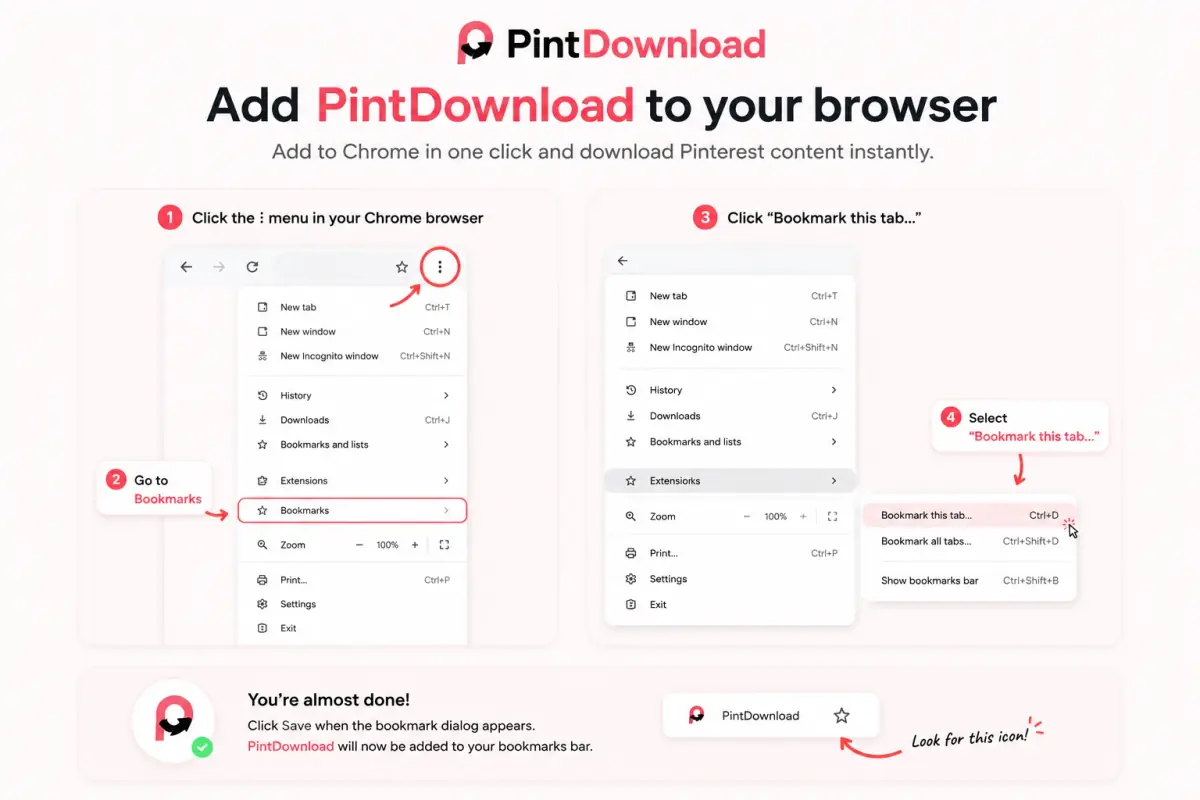
One-click bookmarklet
Save Pinterest videos, photos, and boards while you browse Pinterest on a computer. Click the bookmark on any pin and PintDownload opens with that link ready.
-
Chrome / Edge
Press Ctrl+Shift+B (Cmd+Shift+B on Mac) to show the bookmarks bar, then drag the button onto it.
-
Safari
Drag to Favorites. On iPhone or iPad, bookmark any page, edit its URL, and paste the bookmarklet code.
-
Use it
On a pin or board, click your PintDownload bookmark. We open with the link filled in.
Pin vs Board vs Profile — which tool?
Use the tool that matches your link type. A wrong URL type is the most common reason a download fails.
| Feature | Pin | Board ZIP | Profile ZIP |
|---|---|---|---|
| URL example | pinterest.com/pin/123… | pinterest.com/user/board/ | pinterest.com/user/ |
| What you get | 1 file or full carousel | Many pins → ZIP | Visible pins → ZIP |
| Best for | Saving one idea / video | Moodboards & collections | Creator bulk backup |
| Carousel slides | Yes — every slide | Cover per pin* | Cover per pin* |
| Private / secret content | Not supported | Not supported | Not supported |
* For every carousel slide of a pin inside a board or profile pack, open that pin with the Pin Downloader.
Pinterest downloader FAQ
How to download images from Pinterest without an account?
Is PintDownload free?
What can I download from Pinterest?
How do I download a Pinterest video as MP4?
Can I download boards and profiles as ZIP?
What is the bookmarklet for?
Should I credit original creators?
What does not work?
How do I convert Pinterest to MP4?
Can I download GIFs from Pinterest?
Can I use Pinterest offline?
Embed the downloader on your site
Run a blog or tech site? Add the PintDownload widget for free. Your readers get one-paste downloads; the snippet links back to us.
Paste it anywhere your site accepts HTML.