
Save any Pinterest video directly into your phone gallery or camera roll in HD MP4 format.
Direct Gallery Export
Saves MP4 video streams straight into your phone native Photos app gallery album.
Full High Definition MP4
Maintains original audio clarity and video frame rates without re-encoding quality loss.
Works on iOS & Android
Fully compatible with Apple iPhone (iOS 13+ Safari) and Android (Chrome, Edge, Samsung Internet).
How to save Pinterest video in gallery
Follow these 3 simple steps to save videos to your phone photos gallery.
Pinterest Video URL: https://pin.it/…
-
Step 1: Copy Pinterest Video Link
Open the Pinterest app on your phone, tap the Share icon on the video, and click "Copy Link".
-
Step 2: Paste Link in Online Tool
Open Safari or Chrome browser, paste the link in our downloader above, and tap "Download MP4".
-
Step 3: Save to Phone Gallery / Photos
Tap your browser downloads manager, select the MP4 file, and tap "Save Video" to store it directly in your Gallery app.
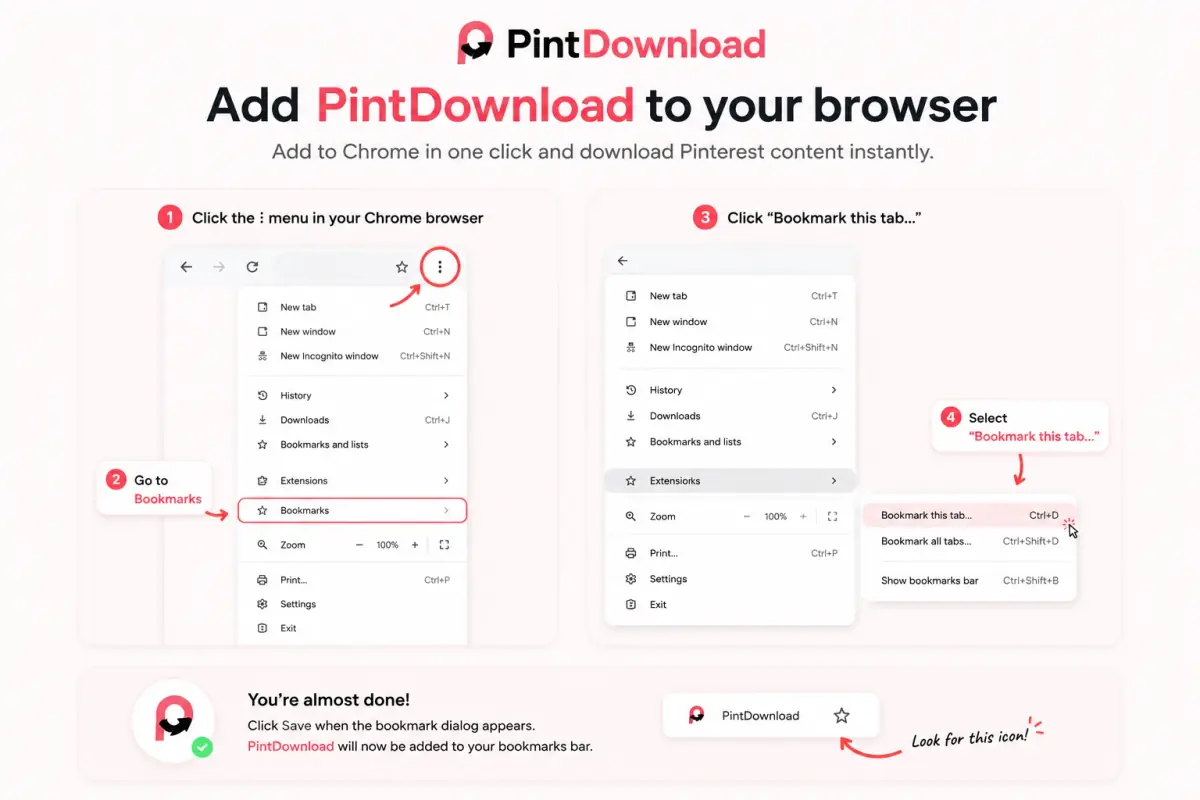
One-click bookmarklet
Save Pinterest videos, photos, and boards while you browse Pinterest on a computer. Click the bookmark on any pin and PintDownload opens with that link ready.
-
Chrome / Edge
Press Ctrl+Shift+B (Cmd+Shift+B on Mac) to show the bookmarks bar, then drag the button onto it.
-
Safari
Drag to Favorites. On iPhone or iPad, bookmark any page, edit its URL, and paste the bookmarklet code.
-
Use it
On a pin or board, click your PintDownload bookmark. We open with the link filled in.
Gallery Download FAQs
How to download Pinterest video in gallery without any app?
Why does my downloaded Pinterest video not show up in my gallery?
Does saving Pinterest videos to gallery cost money or require login?
Related Pinterest download tools
Each tool takes one kind of link. Pick the stock that matches yours and you land on the right downloader first time.
- Pin Pin Downloader One pin URL → HD image, video, GIF, or full carousel.
- MP4 Video Downloader Save public Pinterest videos as MP4 (HD streams).
- HD Image Downloader Photos and artwork in the largest size Pinterest publishes.
- ZIP Board Downloader Paste a board URL and download public pins as a ZIP.
- ZIP Profile Downloader Pack visible public pins from a profile into a ZIP.
- GIF GIF Downloader Download animated GIF pins without quality loss.
- Mobile iPhone & Android Gallery Saver Save Pinterest videos directly to your phone camera roll.
- Slides Carousel Downloader Download all photos and slides from multi-image pins.
- Chrome Chrome Extension Tool 1-click browser download tool for Chrome, Safari, and Edge.
- PC Laptop & PC Downloader Download Pinterest videos as MP4 on Mac, Windows, & PC.
- PFP Profile Picture Downloader Save the largest profile photo Pinterest publishes.
- MP4 Pinterest to MP4 Convert a Pinterest video link to a downloadable MP4.
- MP3 Audio / MP3 Extractor An MP3 of a video pin's sound, made in your browser.