
Save public Pinterest videos as HD MP4 (usually 720p, 1080p when the pin has it) directly to your Windows PC, Mac, or Chromebook laptop.
Windows & macOS Desktop
Works seamlessly on Windows 11/10 PCs, Mac Laptops (MacBook Air/Pro), and ChromeOS.
Keyboard Shortlink Ready
Fast desktop workflow: press Cmd/Ctrl + V to paste and hit Enter to immediately start downloading.
Best Size the Pin Has
Saves the largest MP4 Pinterest publishes for the pin straight into your Downloads folder.
How to save Pinterest video on laptop or computer
Follow these 3 easy steps on Windows or Mac.
Pinterest Video URL: https://pin.it/…
-
Step 1: Copy Video Link on Laptop Browser
Open Pinterest on your laptop web browser, right-click the video pin (or click the Share icon), and select "Copy link".
-
Step 2: Paste Link into Computer Downloader
Head over to PintDownload in a new browser tab, paste the copied URL into the box above, and hit Enter.
-
Step 3: Save the MP4 to Your Downloads Folder
Click "Download MP4" to save the high-definition video file directly into your Mac, Windows PC, or Chromebook Downloads folder.
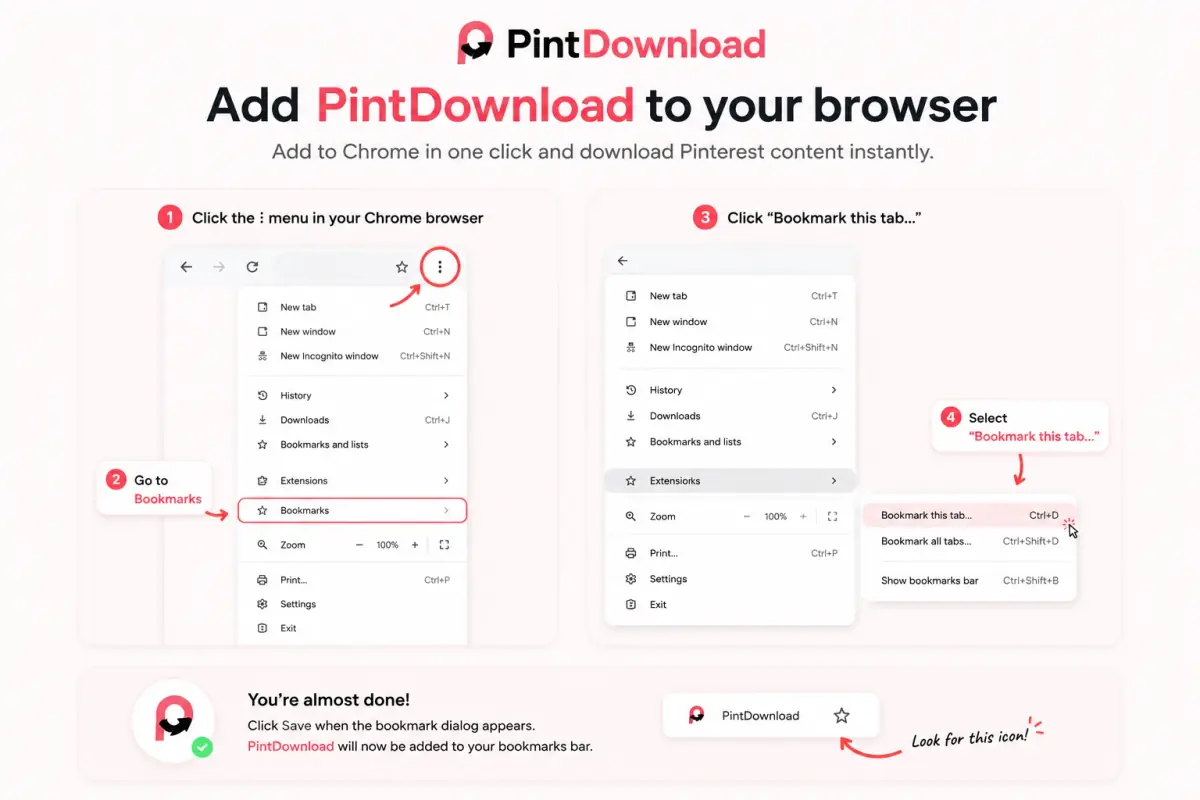
One-click bookmarklet
Save Pinterest videos, photos, and boards while you browse Pinterest on a computer. Click the bookmark on any pin and PintDownload opens with that link ready.
-
Chrome / Edge
Press Ctrl+Shift+B (Cmd+Shift+B on Mac) to show the bookmarks bar, then drag the button onto it.
-
Safari
Drag to Favorites. On iPhone or iPad, bookmark any page, edit its URL, and paste the bookmarklet code.
-
Use it
On a pin or board, click your PintDownload bookmark. We open with the link filled in.
Laptop & PC Download FAQs
How to download Pinterest videos on Windows PC or Mac laptop?
Can I download 1080p Pinterest videos on a laptop?
Does this laptop downloader work on Chromebooks?
Related Pinterest download tools
Each tool takes one kind of link. Pick the stock that matches yours and you land on the right downloader first time.
- Pin Pin Downloader One pin URL → HD image, video, GIF, or full carousel.
- MP4 Video Downloader Save public Pinterest videos as MP4 (HD streams).
- HD Image Downloader Photos and artwork in the largest size Pinterest publishes.
- ZIP Board Downloader Paste a board URL and download public pins as a ZIP.
- ZIP Profile Downloader Pack visible public pins from a profile into a ZIP.
- GIF GIF Downloader Download animated GIF pins without quality loss.
- Mobile iPhone & Android Gallery Saver Save Pinterest videos directly to your phone camera roll.
- Slides Carousel Downloader Download all photos and slides from multi-image pins.
- Chrome Chrome Extension Tool 1-click browser download tool for Chrome, Safari, and Edge.
- Gallery Gallery Video Saver Step-by-step guide to saving Pinterest videos in phone gallery.
- PFP Profile Picture Downloader Save the largest profile photo Pinterest publishes.
- MP4 Pinterest to MP4 Convert a Pinterest video link to a downloadable MP4.
- MP3 Audio / MP3 Extractor An MP3 of a video pin's sound, made in your browser.