Pinterest SEO Masterclass 2026: How to Find & Rank for High-Volume Keywords
A comprehensive 2026 guide to mastering Pinterest search intent, finding high-volume long-tail keywords, and ranking #1 in search results.
 PintDownload Team
 Tips 12 min read 546 words

In this article
Pinterest is not a social network — it is a visual search engine powered by user intent and machine learning. When users open Pinterest, they are not scrolling to see what their friends ate for dinner; they are searching for ideas to act on, buy, or save.
Whether you are trying to rank pins for travel, fashion, recipe blogs, or e-commerce products, understanding Pinterest SEO in 2026 is the single most effective way to build long-term, passive organic traffic. In this guide, we break down how Pinterest indexes content and the exact steps to find and rank for high-volume keywords.
How Pinterest Indexes and Ranks Your Content
Unlike traditional search engines that rely heavily on backlink authority, Pinterest ranks content based on four primary signals:
- Domain & Profile Quality: Account activity, claim status, consistency, and save-to-impression ratio.
- Pin Quality: Freshness of the image asset, engagement velocity (saves, outbound clicks, comments), and visual clarity.
- Keyword Relevance: Text alignment across title, description, image text overlay (via OCR), alt text, and board metadata.
- Pinner Engagement: How pinners in your niche interact with similar topics and board categories.
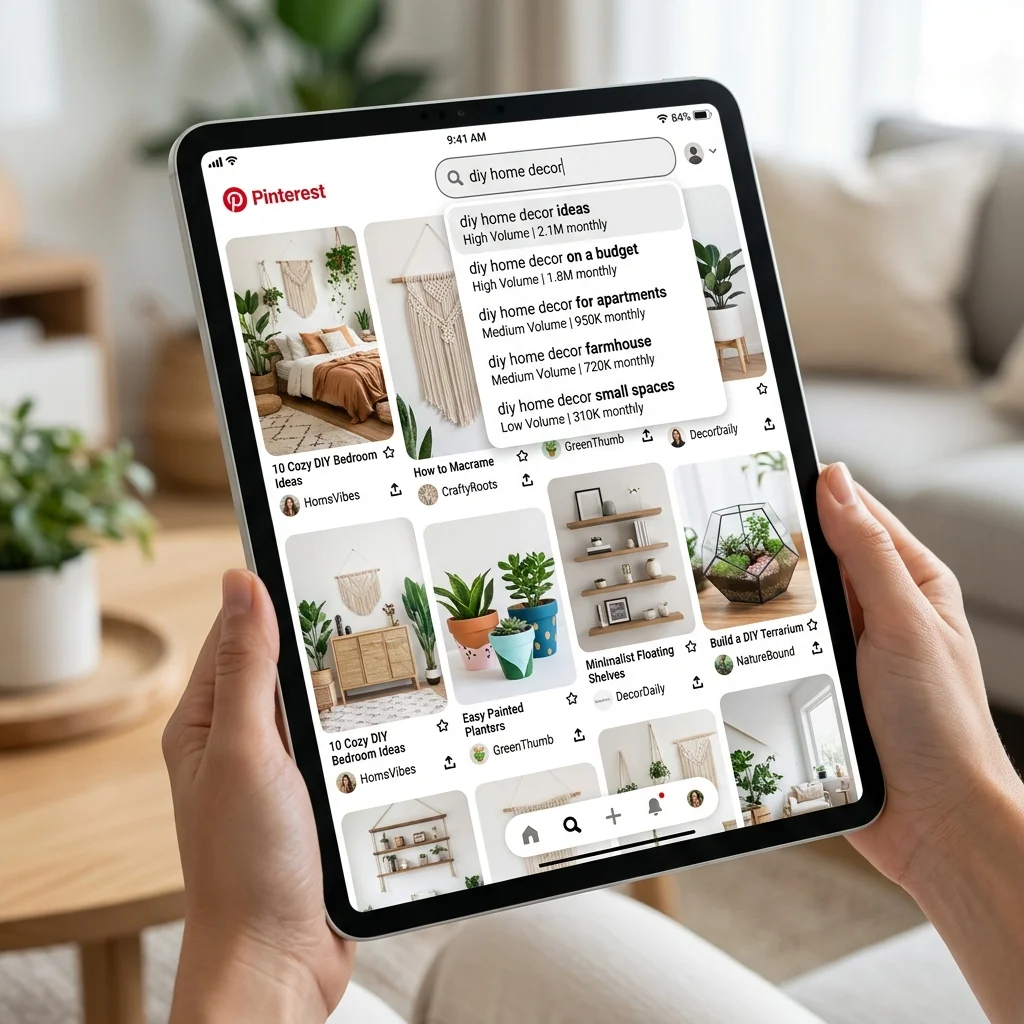
Step 1: Uncover High-Volume Keywords with Guided Search
Finding the right keywords does not require expensive tools. Pinterest gives you direct search data right inside the app:
1. Guided Search Autocomplete
Type your core topic (e.g., "living room decor") into the search bar. Note the autocomplete suggestions that appear beneath the search input. These suggestions are ordered by search volume and frequency.
2. Search Pill Tags
After hitting enter, look at the horizontal colorful "pills" beneath the search box. These represent long-tail keyword modifiers (e.g., "small space", "modern", "budget", "minimalist"). Combining your core term with 2-3 pill modifiers creates high-converting long-tail keyword strings like "small space modern living room decor on a budget".
Step 2: Place Keywords Strategically
Once you have compiled a list of 5–10 relevant keywords, place them across your Pinterest entity structure:
- Pin Title: Put your main keyword near the beginning of your 100-character title. Avoid spammy keyword stuffing; make it sound natural.
- Pin Description: Write a 2-3 sentence paragraph explaining what the user will find when clicking through. Embed 2-4 long-tail phrases naturally.
- Image Text Overlay: Pinterest uses Optical Character Recognition (OCR) to read text rendered on your image graphics. Ensure your pin image clearly states the main headline.
- Board Title & Description: Save pins to boards titled with explicit search terms (e.g., "Minimalist Capsule Wardrobe 2026") rather than creative names like "Stuff I Like".
Pro Tip: Offline Research & Pin Inspection
Analyzing competitor pins offline helps you study image composition, color palette contrast, and keyword overlay strategies without distracting feed algorithm updates.
Step 3: Leverage Fresh Pins for Rapid Indexing
Pinterest heavily prioritizes fresh pin creation. A fresh pin is defined as a brand-new image or video file that has never been uploaded to Pinterest before, even if it links to an existing blog URL or product page.
Creating 3 to 5 visual variations (different colors, headlines, background photos, or layout arrangements) for every piece of content gives you multiple opportunities to test different keywords and capture different search intents.
More in Tips
Keep reading
-
 Tips 6 min readSave Pinterest Content Offline Without Creating an AccountPintDownload Team
 - Tips 6 min readHow to Copy the Correct Pinterest Pin Link for DownloadingPintDownload Team
-
 Tips 11 min readPinterest Fashion & Style Trends 2026: How to Spot & Capitalize on Viral AestheticsPintDownload Team
 - Tips 6 min readPrivate Browsing & Pinterest: What Actually Stays Private?PintDownload Team